Joining a Region
Creating a region
For the purpose of these instructions, someone in our group has presumably created the Region already. You can take a look at the “Create New Region” tab to see what’s involved in this.
Given that someone has done this already, they can share the region ID with us, which is used to join. The region ID isn’t intended to be secure, but keeping it private could reduce unnecessary join requests. We suggest that groups don’t put it on their website or anything, but pass it on directly to people setting up new nodes.
Joining a region
So assuming that we’ve got a region id, can click the “Setup region” link in the sidebar to see the form below.
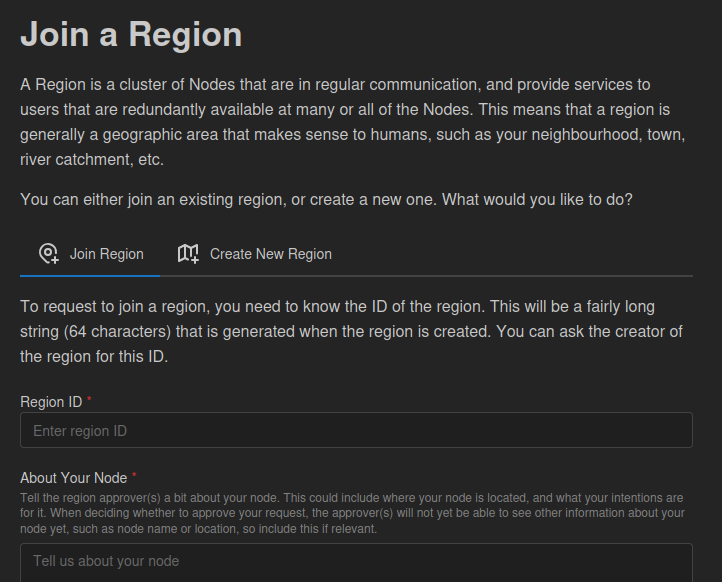
Filling this out is essentially just information provided as part of the join request. It’s not secure, so stick to public information about your request, or if you’d like a more provide conversation about it, indicate that you’ll reach out via another channel.
Once you submit this request, you will be subscribed to information about the region, but your application will be pending.
Getting approval
Right now, approval is centralised. Whichever node created the region needs to approve your request. That’s not what we envisage in the future, as something more suited to decentralised systems and commons governance would imply not putting a single node in charge of who joins. We recommend that groups still use democratic group processes to determine who joins, and just use the approving node to carry out the group’s wishes.
However, in order to get your join request approved, your message is going to need to be able to reach the region creator node, and their response is going to need to reach you. This relies on successfully passing messages between peer nodes in the region, a process that’s called Gossiping, and is covered on the next page.