Your web apps, talking peer-to-peer
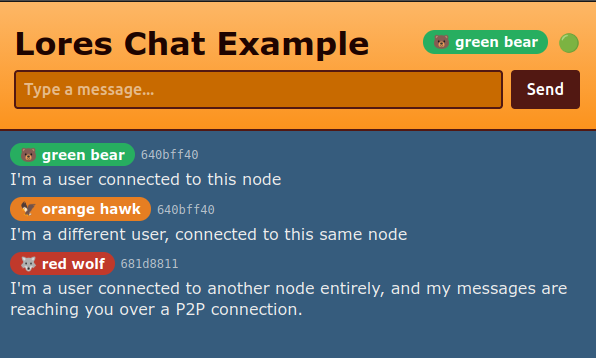
The LoRes Chat Example app working over P2P
It doesn’t look like magic, there are a lot of chat apps out there, but his application provides all the examples that you need to build a range of apps for a LoRes Mesh that synchronise data across different servers in your regional network.
First, some context
If you’ve been following along with Neighbourhood-first Software, you’ll know that it’s all about using peer-to-peer (P2P) technologies to communicate between web servers located across your local area.
As we work through the roadmap for the LoRes project so far the only P2P communication between local nodes has been performed by the LoRes Node Manager software itself - using P2P messages for nodes to coordinate how they connect to each other in a regional network.
The goal though, is for application data to be communicated this way, so that we can have web apps running on servers around our Neighbourhood, and have them talk to each other using radio technologies (like LoRa) that work even when the power and internet are down.
Just one P2Panda Node
LoRes uses P2Panda](https://p2panda.org/) for our P2P communication. P2Panda is a toolbox for building P2P applications that handles some of the tricky bits of managing groups of peers sharing data, storing messages and managing permissions and encryption.
Some apps have P2Panda built in, such as Reflection (a P2P text editor for Gnome). If we did that for every web app on a server, we’d end up duplicating a lot of effort, and likely creating a lot of noise and complexity in our attempt to network these servers together.
So what we want is one P2Panda “node” on one physical server, which can be shared amongst multiple P2P aware web applications.
The LoRes Node software already runs a P2Panda node, so that can be our one node. In fact, LoRes Node doesn’t do much more than that, it’s features mainly relate to nodes within a region learning about each other and networking together. So not only do we have the node, we are also connected to the correct peers to share application data.
A P2Panda API for Co-op Cloud
So how will an application use this shared node? An application essentially wants to share messages with other installations of the same application on other servers within the regional network. That means it needs to publish messages, and subscribe to messages with its peers.
This implies a pretty simple API, which LoRes Node can provide to other applications. After considering a few ways to implement it, such as a HTTP API, or using WebSockets, we settled on gRPC as desired approach. Using gRPC works well, because it has a compact and efficient message format, and because it allows us to subscribe to incoming messages in a way that only hands an application the messages as fast as it can process them, and no faster, through the use of back-pressure.
Introducing, lores-p2panda-client. This is the Rust implementation of a client library for our simple P2Panda API for LoRes.
This client allows us to publish or subscribe to message. To publish a message, for example, we need to supply the following three parameters.
| param | meaning |
|---|---|
region_id |
In LoRes, a region is a network of nodes. We intend it to be local (so that it can use radios and other forms of local transmission) but it doesn’t have to be. Enter the region id of your node here, or if your node is connected to more than one region, pick the one you want to publish to. |
app_namespace |
The data that your app sends will only make sense to your app. You don’t want other apps to get it, so send a string here that is unique to your app, such as the the name of your app |
payload |
Send your application-specific message. It can be any arbitrary bytes you want, encoded in any way that you want |
Trying it out
How do we know if all this works? We need a simple example app that everyone can install and learn from, and as we saw at the top of the article, we have one in the LoRes Chat Example.
This is a simple web app, with a back-end written in Rust and using the lores-p2panda-client library. The front-end is a little one-page React app, with a text box to send messages, and a list of received messages.
In particular with this app, we wanted to highlight the different between the user who authored the message (which we represent here with an animal/colour combination stored in their browser local storage) and the node which originated the message on the P2Panda network (seen in the chat example as a the first 8 characters of the node id, eg “640bff40”).
How to install
First, setup a Co-op Cloud server running LoRes Node
The easiest way to do this is to walk through our Initial node setup documentation. This is focused on using a Raspberry Pi, but should essentially work fine on any server if you’re happy to skip the Pi specific bits.
Alternatively, if you’re already hosting a Co-op Cloud server, you just need to follow the documentation for Installing LoRes Node.
If you already have this, make sure your LoRes Node is running at least version v0.19.4.
Second, install the LoRes Chat Example app
You should already be setup with abra at this point, so run:
abra app new lores-chat-example
You can use a shorter name than that when picking the name for your app, I recommend chat.YOUR_SERVER_DOMAIN.
Then, as normal for abra, you open the configuration with:
abra app config chat.YOUR_SERVER_DOMAIN
You need to set one variable in this config file.
PANDA_GRPC_ADDR=http://YOUR_LORES_NODE_SERVICE_NAME:50051
Instead of YOUR_LORES_NODE_SERVICE_NAME, write the docker service name of your lores-node installation on this server. You can find this on your server by running (while logged into the server over ssh) the following:
docker service ls | grep lores-node | grep _app
And now you’re up and running
🎉 You now have a working chat app that lets you communicate between nodes. This is an important step towards local community servers that communicate with each other.
If it sparks your interest, here are some potential next steps:
- You could use the example chat app as a base to build some other kind of Neighbourhood-first App. The messages between servers don’t have to be chat message. They could be application events, like “task added to list” or “friend request received”.
- You could help out with our roadmap. As we move towards Static websites for individuals we’re going to use this LoRes P2Panda API to send messages like “website X installed on server Y”
- In particular, you could help out with the first big challenge in this space, which is how do we get an Identity and Access Management App like Rauthy, Kanidm or Authentik using our P2Panda API for synchronising
- You could try getting this working over a real post-internet connection, like LoRa radios and/or by using Reticulum. We have ideas on how to do this, please reach out.