Updating lores-node
We installed lores-node using abra in the lores-node section of the “Initial setup” guide.
Abra update
These commands are run on your dev computer.
abra app upgrade APP_DOMAIN
Replace APP_DOMAIN with the domain you used for lores-node. Most apps have an app-name in front, but with lores-node we generally use the root domain of the server. That is probably YOUR_HOSTNAME.local (with YOUR_HOSTNAME replaced with the name you used).
If you aren’t sure what you called it, you can check with abra app list.
Checking if it worked
Open that same APP_DOMAIN url in your browser, to see the lores-node web interface. In the left hand sidebar, you should see a version number down the bottom. This will let you know if you have deployed the version you intended to.
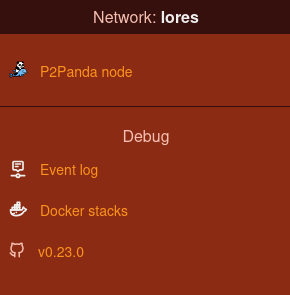
The lores-node sidebar showing the verison number.
How do I know if it’s the latest version?
You can see the latest version released, and it’s changelog (list of things that have changed), on the github release page for lores-node.